Maksin AI Compliance Evidence
Twilio / TCR Reviewers
Official SMS Consent Verification Page
This SMS program applies only to registered Maksin AI users and business owners. It is not used for messaging customers of participating businesses.
This page is provided specifically for Twilio A2P 10DLC and The Campaign Registry reviewers. Because portions of Maksin AI require authentication, this page publicly reproduces the production SMS consent workflow, disclosure language, message examples, screenshots, and reviewer evidence used in production. The information below matches the production application source of truth.
Public route
https://maksin-ai.com/sms-consent
Company
Maksin Technologies LLC
Support
support@maksin-ai.comExecutive Summary
SMS Consent Summary
Section 1
SMS Consent is Optional
Registered Maksin AI users and business owners are not required to agree to SMS messages to create an account, complete onboarding, test the AI receptionist, access their workspace, or receive support.
Consent is optional and never required.
This optional checkbox is not required to create an account, complete onboarding, use the platform, or receive support. By checking this box, you consent to platform SMS messages from Maksin AI under our Privacy Policy and Terms of Service.
Section 2
Production Opt-In Workflow
Step 1
Registered user visits the application
https://app.maksin-ai.com/
Step 2
Registered user creates an account
https://app.maksin-ai.com/sign-up
Step 3
Registered user begins onboarding
Authenticated onboarding route: /onboarding
Step 4
Registered user completes setup steps before phone
Company, Business category, Website, and Service area appear before the phone step.
Step 5
Registered user enters a business phone number
The Business phone field appears on the Phone step.
Step 6
Registered user reviews the optional SMS disclosure
The SMS consent checkbox appears immediately below Business phone and is unchecked by default.
Step 7
Registered user clicks Next
The flow can continue without checking the SMS consent box.
Step 8
Consent result is recorded on setup submission
If unchecked, smsConsent remains false and no SMS consent is enabled.
If the optional checkbox is unchecked, no SMS consent is enabled. Consent is never inferred from visiting the application, creating an account, using the dashboard, or testing the AI receptionist.
Section 3
Audited Production Onboarding Form
The production SMS opt-in appears on the authenticated route /onboarding. The source of truth audited for this page is app/onboarding/page.tsx.
| Field name | Step label | Visible label | Placeholder or state |
|---|---|---|---|
| companyName | Company | Company name | Acme Service Co |
| businessCategory | Business type | Business category | Select your business category |
| businessWebsiteUrl | Website | Website URL | https://example.com |
| serviceArea | Service area | Service area | Baltimore County, Howard County, nearby areas |
| phone | Phone | Business phone | (555) 555-0100 |
| smsConsent | Phone | I agree to receive account verification, phone verification, AI receptionist setup, platform notifications, security alerts, operational alerts, new lead notifications, and platform support messages from Maksin AI. Consent is not a condition of purchase or service. Message frequency varies. Message and data rates may apply. Reply STOP to opt out or HELP for help. Terms: https://maksin-ai.com/terms Privacy: https://maksin-ai.com/privacy. | unchecked checkbox |
| Business email | you@company.com |
Phone step title: What's your business phone number?
Phone step description: Used for account setup and phone verification. SMS consent is optional.
SMS checkbox position: Immediately below the Business phone input and above the Back/Next buttons.
Checkbox default state: unchecked
Buttons on this step: Back, Next
Text immediately above checkbox: Business phone input label and phone step description are visible before the checkbox.
Text immediately below checkbox: This optional checkbox is not required to create an account, complete onboarding, use the platform, or receive support. By checking this box, you consent to platform SMS messages from Maksin AI under our Privacy Policy and Terms of Service.
Section 4
Static HTML Reproduction of the Production Phone Step
This non-submitting HTML block reproduces the authenticated onboarding Phone step where SMS consent is shown. It exists solely so Twilio reviewers can inspect the opt-in workflow without authentication. It has no backend, no submit action, and no JavaScript requirement.
- 1Company
- 2Business type
- 3Website
- 4Service area
- 5Phone
- 6Email
Step 5 of 6
What's your business phone number?
Used for account setup and phone verification. SMS consent is optional.
Section 5
Production Onboarding Screenshots
These screenshots are captured from the authenticated onboarding Phone step using sanitized test values. They contain no private account information, real phone numbers, tenant identifiers, tokens, or secrets.
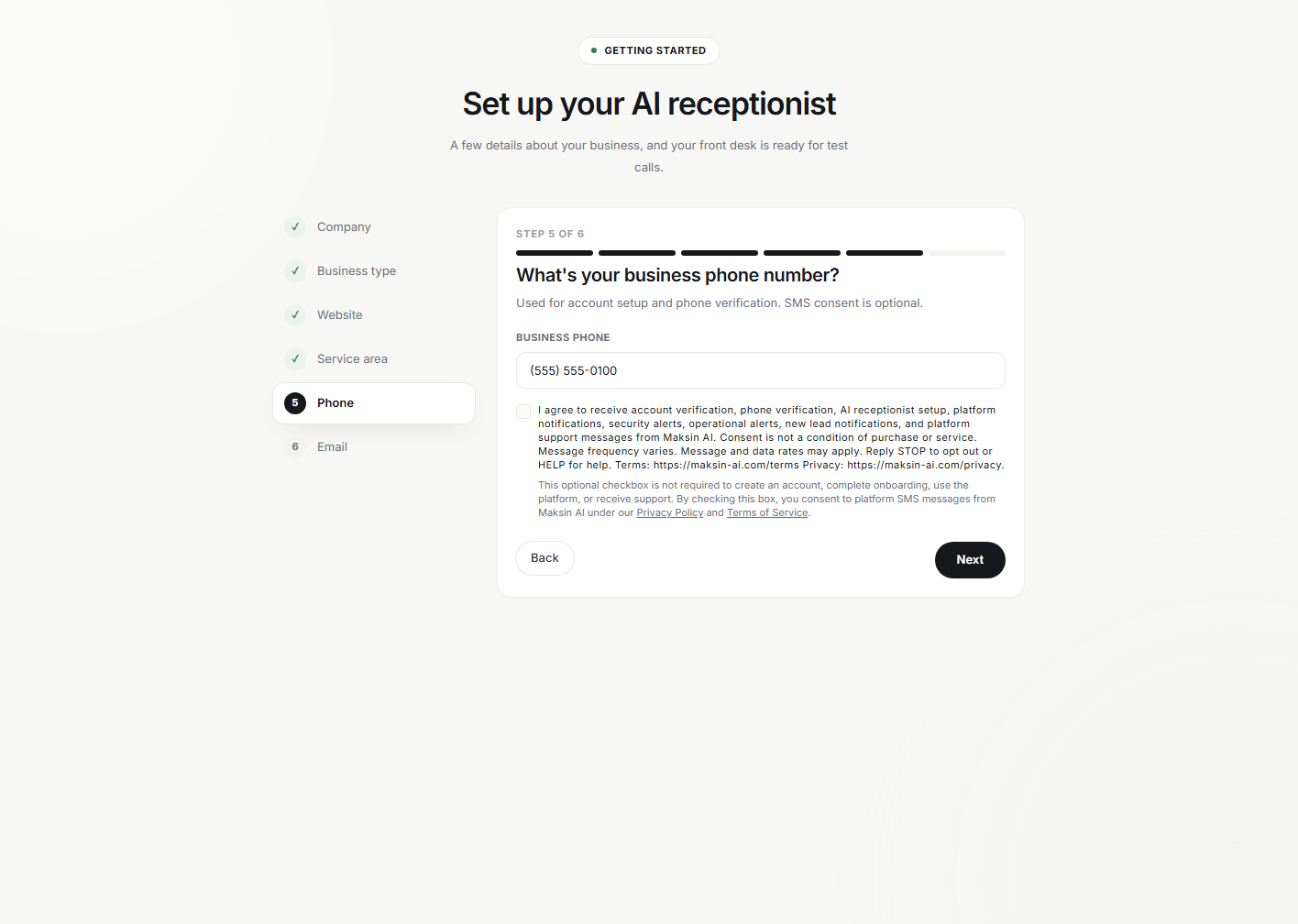
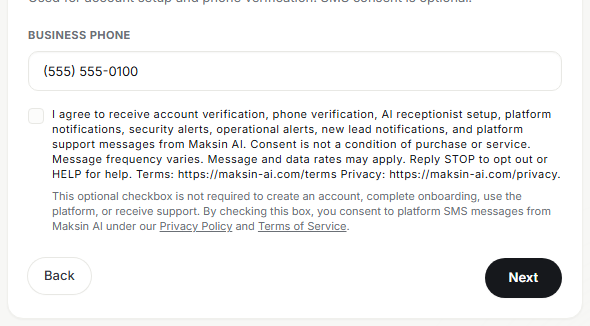
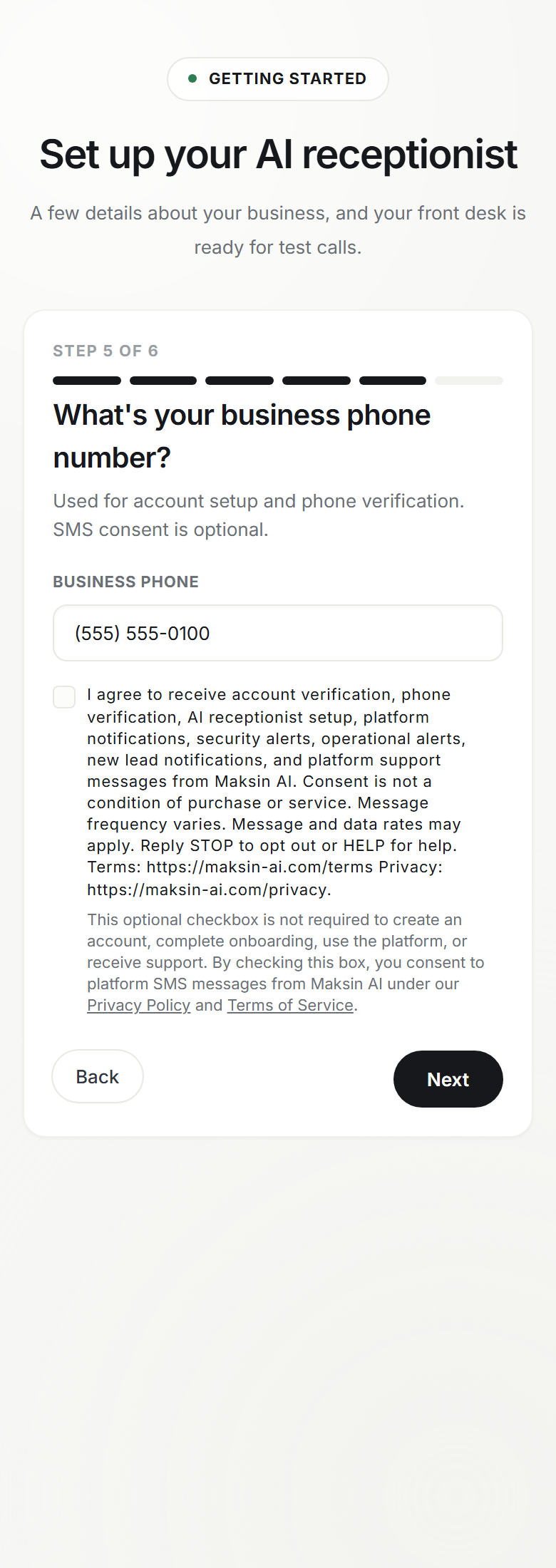
Section 6
Public Static Reproduction of the Production Opt-In Flow
The production onboarding route requires authentication. To support Twilio, TCR, carrier reviewers, and audit tooling, this public page reproduces the production opt-in flow without requiring login or JavaScript.
- The static form above reproduces the exact production Phone step: Business phone, optional SMS checkbox, disclosure text, and Back/Next buttons.
- The checkbox is unchecked by default and optional.
- The disclosure text is imported from the same source constant used by the authenticated onboarding form.
- The Next button appears after the SMS disclosure, matching the production opt-in placement.
- The onboarding flow can continue without selecting SMS consent.
- The reproduction is publicly accessible without an account and remains readable with JavaScript disabled.
Section 7
Exact Production Disclosure
The following block is assembled from the same shared constants imported by the production onboarding page.
I agree to receive account verification, phone verification, AI receptionist setup, platform notifications, security alerts, operational alerts, new lead notifications, and platform support messages from Maksin AI. Consent is not a condition of purchase or service. Message frequency varies. Message and data rates may apply. Reply STOP to opt out or HELP for help. Terms: https://maksin-ai.com/terms Privacy: https://maksin-ai.com/privacy.

This optional checkbox is not required to create an account, complete onboarding, use the platform, or receive support. By checking this box, you consent to platform SMS messages from Maksin AI under our Privacy Policy and Terms of Service.
Section 8
Consent Storage
When onboarding SMS consent is granted, Maksin AI stores consent electronically on the tenant record in Firestore for the registered Maksin AI user or business owner. Audit trail fields are retained for review.
Onboarding checkbox fields
- smsConsentGranted
- smsConsentTimestamp
- smsConsentSource
- smsConsentPhone
- tenantId
- ownerUid
Section 9
Message Types
Maksin AI does not use this campaign for marketing or promotional messages.
Platform Messages
- One-time verification codes
- Account verification
- AI receptionist setup notifications
- Phone verification
- Platform notifications
- Security notifications
- Operational alerts
- Platform support
- New lead notifications
Supported campaign categories
- One-time verification codes
- Account verification
- Phone verification
- AI receptionist setup notifications
- Platform notifications
- Security notifications
- Phone configuration updates
- Operational alerts
- Platform support
- New lead notifications
Section 10
Sample Messages
OTP
Maksin AI: 123456 is your verification code. We'll use it to verify your phone number. Reply STOP to opt out or HELP for help.
AI receptionist setup
Maksin AI: Your AI receptionist has been successfully configured and is ready for testing. Reply STOP to opt out or HELP for help.
Phone verification
Maksin AI: Your phone verification is ready. Complete verification to finish setting up your account. Reply STOP to opt out or HELP for help.
New lead notification
Maksin AI: A new lead has been captured for your business. Sign in to your Maksin AI dashboard to review it. Reply STOP to opt out or HELP for help.
Phone configuration
Maksin AI: Your business phone configuration has been updated successfully. Reply STOP to opt out or HELP for help.
Section 11
STOP / HELP Behavior
Opt out keywords
STOP, STOPALL, END, CANCEL, QUIT, UNSUBSCRIBE
Opt in keywords
START, YES
Help keywords
HELP, INFO
Maksin AI: You have opted out and will no longer receive text messages from this number. Reply START to opt in again.Maksin AI: For help, contact support@maksin-ai.com. Reply STOP to opt out.Maksin AI: You are opted in to receive platform, account, phone verification, security, setup, operational alert, support, and new lead notification messages. Message frequency varies. Msg & data rates may apply. Reply STOP to opt out or HELP for help.Section 12
Compliance Checklist
| Requirement | Status | Evidence |
|---|---|---|
| Public HTTP 200 page | PASS | Route /sms-consent is public and unauthenticated. |
| SMS consent optional | PASS | This optional checkbox is not required to create an account, complete onboarding, use the platform, or receive support. By checking this box, you consent to platform SMS messages from Maksin AI under our Privacy Policy and Terms of Service. |
| Consent not condition of purchase | PASS | Disclosure states consent is not a condition of purchase. |
| Checkbox unchecked by default | PASS | Static reproduction renders unchecked. |
| Form can continue without SMS | PASS | Onboarding schema defaults smsConsent to false. |
| Separate SMS checkbox | PASS | SMS consent is collected in a dedicated checkbox. |
| Opt-in method explained | PASS | Production onboarding workflow is listed step by step. |
| Message purpose disclosed | PASS | Message categories are listed. |
| Message frequency disclosed | PASS | Disclosure states message frequency varies. |
| Message/data rates disclosed | PASS | Disclosure states message and data rates may apply. |
| STOP disclosed | PASS | Disclosure and keyword section list STOP behavior. |
| HELP disclosed | PASS | Disclosure and keyword section list HELP behavior. |
| Privacy Policy linked | PASS | https://maksin-ai.com/privacy |
| Terms linked | PASS | https://maksin-ai.com/terms |
| Support contact listed | PASS | support@maksin-ai.com |
| Non-sharing privacy statement | PASS | Mobile numbers and SMS consent are not sold or shared for marketing. |
| Carrier notice included | PASS | Carriers are not liable for delayed or undelivered messages. |
| Consent storage described | PASS | Registered user onboarding SMS consent fields are described. |
| Consent not inferred | PASS | Page states SMS consent is enabled only through the optional onboarding checkbox. |
| Opt-out disables future SMS | PASS | STOP response and opt-out behavior are shown. |
| Opt-in restart supported | PASS | START and YES are listed. |
| No marketing messages claimed | PASS | Message types are transactional and operational only. |
| Sample messages included | PASS | Five production message examples are listed. |
| Production wording included | PASS | Exact checkbox and helper strings are shown in a code block. |
| Public static reproduction | PASS | Static HTML reproduction is available without account creation or JavaScript. |
| Exact production field order | PASS | The audited field sequence matches app/onboarding/page.tsx. |
| Production Phone step reproduced | PASS | Business phone, smsConsent, helper text, Back, and Next match the production phone step. |
| Submit button placement | PASS | The Next button appears after the optional SMS consent checkbox and helper disclosure. |
| Public reviewer evidence | PASS | The static reproduction is available without account creation. |
| Production form screenshot publicly accessible | PASS | /images/compliance/sms-consent-onboarding-full.png |
| Phone field and checkbox visible in one frame | PASS | /images/compliance/sms-consent-checkbox-detail.png |
| Checkbox visibly unchecked | PASS | Screenshots and static reproduction show the checkbox before selection. |
| Disclosure visible before submit | PASS | Detail screenshot and static reproduction show disclosure before the Next button. |
| Privacy and Terms visible | PASS | Legal links are visible in the screenshot detail and exact static reproduction. |
| Submit button visible | PASS | Phone step screenshot shows the production Next button. |
| Screenshot contains no private data | PASS | Screenshots use sanitized test business name, phone number, and email values only. |
Section 13
Technical Verification
- Phone entered
- SMS checkbox reviewed
- Optional selection
- Next
- Finish onboarding
- Consent stored
- Platform SMS enabled
Consent is never inferred. Only explicit opt-in through the optional onboarding checkbox enables platform SMS eligibility for registered Maksin AI users and business owners.
Section 14
Public Evidence Links
| Evidence | URL |
|---|---|
| Privacy Policy | https://maksin-ai.com/privacy |
| Terms of Service | https://maksin-ai.com/terms |
| SMS Consent Verification | https://maksin-ai.com/sms-consent |
| Full onboarding form | https://maksin-ai.com/images/compliance/sms-consent-onboarding-full.png |
| Phone field and SMS disclosure detail | https://maksin-ai.com/images/compliance/sms-consent-checkbox-detail.png |
| Mobile onboarding form | https://maksin-ai.com/images/compliance/sms-consent-mobile.png |
| Support | mailto:support@maksin-ai.com |
| Company Website | https://maksin-ai.com/ |
| Application Sign Up | https://app.maksin-ai.com/sign-up |



Section 15
Carrier Notice
SMS consent, SMS opt-in data, and phone numbers collected for SMS communication purposes will not be sold, rented, shared, or disclosed to third parties or affiliates for marketing or promotional purposes.
Carriers are not liable for delayed or undelivered messages.
Section 16
Contact
Support
support@maksin-ai.com